Recommend WP8NOKIA to your friends...

Internet Explorer 10 for Windows 7 is ready for download


Earlier this month, Microsoft announced that it will release the first version of Internet Explorer 10 for Windows 7 users sometime in November. "Preview Release" of the latest Microsoft browser will be made after the launch of Windows 8 on October 26th, including IE10.

Now it appears that Microsoft is wasting no time preparing for the launch of Windows 7 IE10. The company has posted a download page for the browser, although there is no time of the linking.

The page does show that in addition to the 32-bit and 64-bit versions of Windows 7 (with Service Pack 1 installed), Microsoft will also have a version of IE10 available for Windows Server 2008 R2 SP1 in its 64-bit incarnation. There are 36 different language versions that will be offered, plus four additional display languages.

The site also has a link that shows the system requirements for your browser. They are as follows:


Processor 
Computer with a 1 gigahertz (GHz) 32-bit (x86) or 64-bit (x64) processor. 
Operating system
Windows 7 32-bit with Service Pack 1 (SP1) or higher
Windows 7 64-bit with Service Pack 1 (SP1) or higher
Windows Server 2008 R2 with Service Pack 1 (SP1) 64-bit
Memory
Windows 7 32-bit—512 MBWindows 7 64-bit—512 MBWindows Server 2008 R2 64-bit—512 MB
Hard drive space
Windows 7 32-bit—70 MB
Windows 7 64-bit—120 MB
Windows Server 2008 R2 64-bit—200 MB
Drive
CD-ROM drive (if installation is done from a CD-ROM)
Display
Super VGA (800 x 600) or higher-resolution monitor with 256 colors
Peripherals
Modem or Internet connectionMicrosoft Mouse, Microsoft IntelliMouse, or compatible pointing device


Via:www.neowin.net
Read more...

WP8 wallpaper extracted from WP8 SDK build 9900

This is a full background of Windows Phone 8, is extracted from the Windows Phone Emulator 8 SDK Developer Preview version build 9900. 

Link Album Skydrive


Read more...

Check out the Surface was dropped from 30 inches

Microsoft obviously get creative when showing RT wall video mat.Trong new one posted to their YouTube channel, we found the device a 30 "on a hardwood floor. Well, we do not really looksee it as what we are seeing video taken from the surface as it is sent to the ground.

Read more...

Despite all the criticism, RT Surface is still selling well


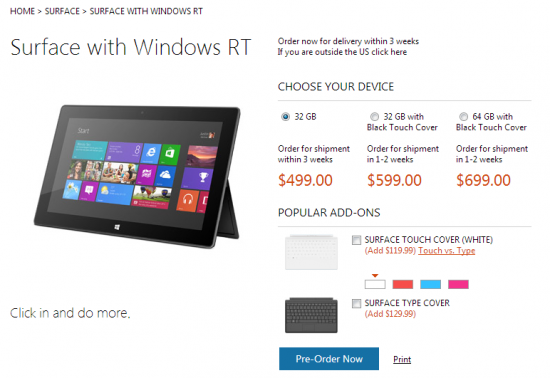
The Microsoft Surface RT tablet became available for pre-order back on October 16th and we've seen select model's availability (or shipping date) shift from October 26th to shipments not expected for up to three weeks. We are seeing this happen in different areas and in some cases affect all three options RT surface.


Microsoft's online store for the U.S. market is no longer listed any surface of the three options RT is available on October 26th. Shipping estimates range from "within three weeks" for the 32GB model and "1-2 weeks" for the 32GB and 64GB models that come with covers.

We've even had one tipster report receiving notice from Microsoft asking they pick up their Surface on the October 27th instead of the October 26th launch date. Not sure if this is due to holding inventory for walk-in customers on the 26th or that pre-order shipments to the store have been delayed.  We'll try to get clarification on this one.


We still do not know what as far as sales representatives is a major concern, but based on changes in the estimated shipping date, it looks like most are opting for the 32GB Surface RT without the cover.  Regardless, it is nice to see the order of the surface as well and hope that demand will remain high and the assembly line of Microsoft can keep up with the speed.


Read more...

How to get back the classic Start menu in Windows 8 RTM

Windows users still miss the old Start menu in Windows 8 can revive it, courtesy of three handy utility.
Okay, I confess. After all the months of testing and using Windows 8, I still miss the classic Start menu. Microsoft has tried to lure me into the new Start screen, and I can see some clear benefits to it. But for me, the Start menu is still the easiest way to organize, locate, and launch wide array of desktop applications.


If you are in the same boat, do not be afraid. ViStart, Classic Shell, and StartMenu7 all do a good job of copying the classic Start menu with the folder, its shortcuts, and easy access to popular sites of Windows.
Concerns emerged that Microsoft will disable the functionality of the application start menu so in the final version of Windows. But I have tested all three utilities, and all work just fine in Windows 8 RTM version released last week.


+ Easy to Switch between Metro and Desktop Interface
You can easily switch between the two modes by pressing and holding the Windows key, depending on your preference.

+ Faster access to programs and files

StartMenu8 in the Start Menu, where you can get quick access to programs, documents and files, control panel and settings.

+ Faster search


+ Customization according to your needs

You can pin programs to the Start Menu and Taskbar to quick access to your favorite programs. It is easily customizable to have everything you need just one click.

+ Very safety and security


Click below to download

Read more...

Nokia Lumia 510 official launch was imminent

Nokia India just posted a new status with the following contents:
610 - 100 = ? Stay tuned. Coming soon.
 
Configuration
  • 4 “LCD screen,
  • 5MP
  • 120.7 x 64.9 x 11.51 (mm), 129 (g)
  • GSM-WCDMA-HSPA
  • 800MHz MSM7227A + 256MB RAM + Windows Phone 7.8 

You can see more videos using the Lumia 510 below.

Read more...

Office 2013 Web apps appeared on SkyDrive

In what appears to be a series of activities to prepare for what promises to be a whirlwind two weeks of news with the launch of Windows 8, Microsoft Surface, Windows Phone 8, and top with Build Mastergroup has flipped the switch on Office 2013 Web Apps.
We've seen Windows update pushed out to users, update Windows 8 "build" the application, an update to the Mouse and Keyboard 2.0 driver set for Windows 8 , and more in just a few days, and now, according to a tweet from SkyDrive program Omar Shahine management, Office Web Apps is "aive"

The Office 2013 Web Apps are now alive on #SkyDrive :-). Enjoy! Kudos to my friends in the Microsoft Office Division!
@OmarShahine
Omar Shahine

You can check out Office Web Apps by going to SkyDrive, and (in Outlook.com version) clicking on the "Create". Office Web Apps is available in preview form since the end of July, when we give you a detailed look at the application. No word as yet from the blog of the Office Web Apps or Office Next blog, Web Apps was first announced, the change from the preview.


You can view the brief video about the Office Web Apps at here:

Read more...